

Download MB Janam Kundali – Vedic Astrology, Birth Chart Calculator, Indian Astrology Tool
Overview
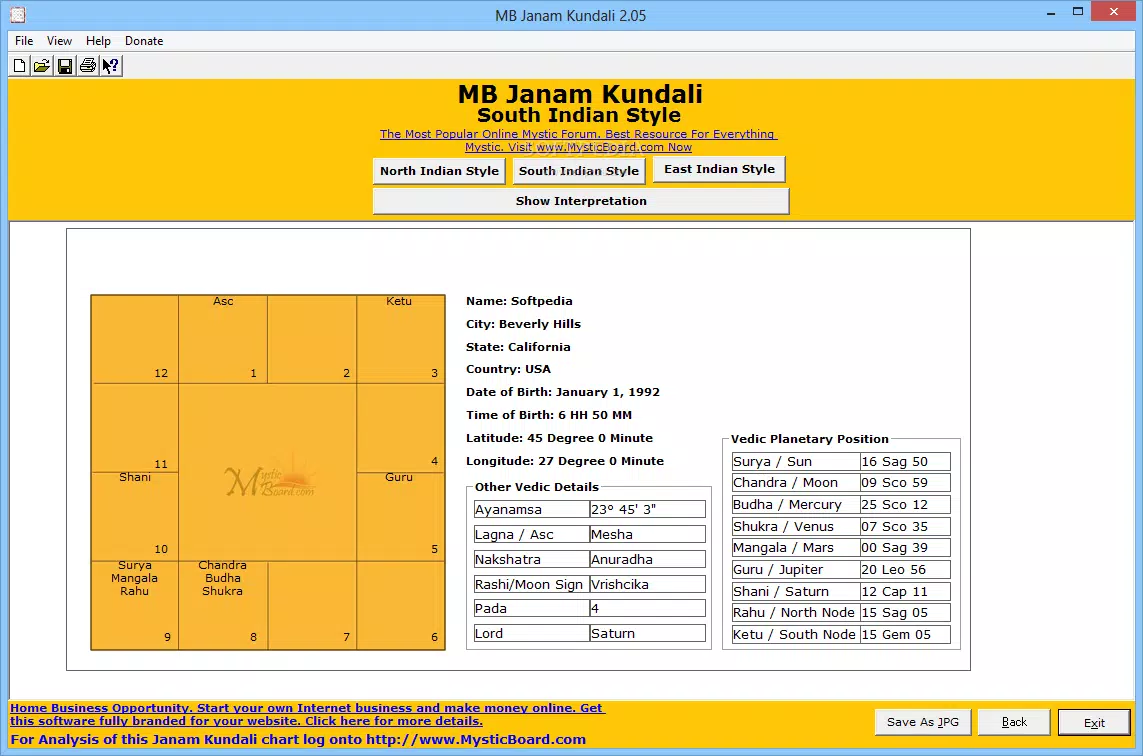
MB Janam Kundali is a mobile application tailored for individuals with a foundational understanding of Vedic astrology. Designed as a specialized tool, it calculates planetary positions at the exact time of a user’s birth and generates birth charts in multiple traditional formats—North Indian, South Indian, and East Indian styles. The app serves as a practical utility for experienced practitioners and enthusiasts who require precise chart generation without the need for manual calculations.
While it does not provide beginner-level explanations or educational content, it fills a niche in the mobile astrology ecosystem by offering a focused, no-frills solution for chart creation. The target audience includes Vedic astrologers, spiritual seekers, and individuals seeking deeper insights into their natal charts. The developer, MB Software, appears to focus on functionality over user onboarding, suggesting a product built for users already familiar with astrological terminology and chart interpretation.
Real-world use cases include personal chart analysis, horoscope verification, and supporting astrological consultations. In the broader context of mobile tools, MB Janam Kundali stands out as a dedicated resource within the education and spiritual categories, offering a streamlined alternative to more complex desktop-based astrology software.
Key Features & Functionality
- Accurate Birth Chart Calculation – The app uses precise astronomical algorithms to determine the positions of planets at the user’s time of birth. This feature ensures reliability for users who depend on accurate data for astrological analysis.
- Multiple Chart Styles – Users can generate birth charts in North, South, or East Indian formats, accommodating regional variations in Vedic astrology presentation and interpretation.
- Simple Input Interface – The app provides straightforward input fields for date, time, and place of birth, allowing users to enter their details efficiently. The interface includes a feature to locate the birthplace’s latitude and longitude, though it redirects to a Google search page for manual lookup.
- Readable and Organized Output – Results are displayed in a clean, structured layout, enabling users to quickly interpret planetary placements, house positions, and other key elements of the chart.
- Chart Export Option (Pro Feature) – Purchasing the app unlocks the ability to save generated charts as JPEG files, facilitating sharing, printing, or archival purposes.
These features serve experienced users who require fast, accurate chart generation. For instance, an astrologer preparing for a consultation can input client data and instantly receive a formatted chart. A spiritual practitioner may use the app to analyze personal growth patterns based on planetary alignments. The lack of built-in explanations or guided interpretations means the app functions best as a backend tool rather than a learning platform.
Interface, UX & Performance
The user interface of MB Janam Kundali presents a functional but visually cluttered layout on initial access. While the core input fields are accessible, the arrangement of buttons and text elements may feel overwhelming for new users. However, as users progress through the workflow, the interface becomes more intuitive, suggesting a learning curve that experienced users can navigate with ease.
Navigation is linear—input birth details, generate chart, view results—without unnecessary steps. The app does not display loading indicators or animations, which may affect perceived responsiveness, especially on lower-end devices. Although the developer did not list formal performance metrics, the app’s file size of 2.8 MB indicates a lightweight design, likely contributing to fast launch times and minimal battery usage.
Responsiveness across device categories is not formally documented, but the app’s small footprint suggests compatibility with a wide range of Android smartphones and tablets. Stability appears consistent based on available user reports, though no crash data was provided. Overall, the UX prioritizes functionality over aesthetic polish, making it suitable for users focused on results rather than visual appeal.
Platform Compatibility & Technical Requirements
MB Janam Kundali is available exclusively on the Android platform. The app requires Android 5.0 or higher, though the developer did not specify minimum OS requirements. The current version is 1.2, released on May 14, 2024.
The application size is 2.8 MB, which is compact and suitable for devices with limited storage. This small footprint makes the app ideal for users with older or budget-friendly Android devices. The app is free to download and install, with no in-app purchases or ads visible in the core functionality.
While the developer did not disclose specific hardware requirements, the lightweight nature of the app suggests broad compatibility across entry-level and mid-range Android smartphones. No information was provided regarding support for iOS or other operating systems.
Pros and Cons
Pros
- Accurate planetary position calculations for Vedic astrology
- Supports multiple traditional Indian chart styles (North, South, East)
- Lightweight file size (2.8 MB) ensures fast installation and low storage use
- Free to download and use with no ads or hidden costs
- Chart export feature available for users who purchase the app
Cons
- Interface may appear cluttered and overwhelming for new users
- Lacks beginner-friendly explanations or educational content
- Latitude and longitude lookup redirects to Google search, requiring manual input
- Developer did not provide detailed performance or compatibility specifications
- No support for iOS or other platforms
FAQ
Is MB Janam Kundali safe to download and install?
Yes, the app is free from known malware and is distributed through official Android channels. Its small file size and lack of suspicious permissions contribute to a secure user experience.
Can I use MB Janam Kundali without prior knowledge of astrology?
The app is designed for users with existing familiarity with Vedic astrology. It does not include tutorials or explanations for interpreting charts, so beginners may find it challenging to use effectively.
Does the app require an internet connection?
Basic chart generation does not require an internet connection. However, the latitude and longitude lookup feature redirects to Google, which requires an active connection.
Is MB Janam Kundali available for iOS devices?
Currently, the app is only available on Android. The developer has not announced plans for iOS support.
How often is MB Janam Kundali updated?
The latest version, 1.2, was released on May 14, 2024. No information was provided about the frequency of future updates.
Final Thoughts
MB Janam Kundali delivers a focused, efficient solution for experienced users of Vedic astrology. Its strength lies in accurate chart generation across multiple regional styles, a lightweight design, and a free pricing model. While the interface could benefit from a cleaner layout and the app lacks educational content for beginners, it remains a valuable tool for those already versed in astrological interpretation.
The ability to export charts as JPEG files adds practical utility for sharing or record-keeping. For individuals seeking a no-nonsense, reliable birth chart calculator on Android, MB Janam Kundali offers strong value. Download MB Janam Kundali now.


